|
Set your global settings and optionally apply them to all portals.
Settings can be overridden on "per portal" basis.
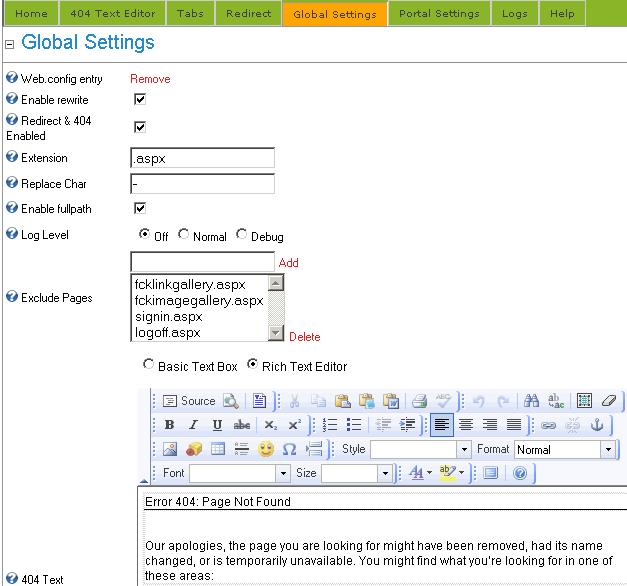
| • | Web.config entry Add / Remove - this adds or removes the required web.config entry |
| • | Enable / disable the URL rewriting, |
| • | Enable / disable redirects and the 404 error redirect |
| • | Set the extension (default setting is .aspx) |
| • | Spaces in tab names will be replaced by (default character is dash '-'). This will only replace spaces in URL's not in actual tab names! |
| • | Enable full path - this will construct hierarchical URL's reflecting site structure: /root-tab/sub1-tab/sub2-tab/sub3-tab.aspx
This option will also allow the duplicate tab names in different tab hierarchies. |
| • | Log level - set desired log level or turn logging off. |
| • | Exclude pages - add pages that will not be rewritten such as payment gateways, etc. |
| • | Text Editor - enter your 404 Page Not Found message |
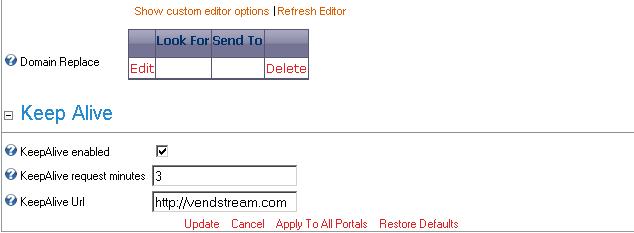
| • | Domain replace - replace domain with another domain. Useful when portal answers multiple aliases.
 |
| • | KeepAlive enabled - enable /disable keep alive http requests |
| • | KeepAlive URL - enter url for keep alive http requests. On multi-portal installations only one URL is needed because all portals are on the same Asp Net application. |
|