Set the default options as needed.
Settings can be overridden on "per portal" basis.
This is especially important if you have multi-portal setup because the settings will be applied to all portals.
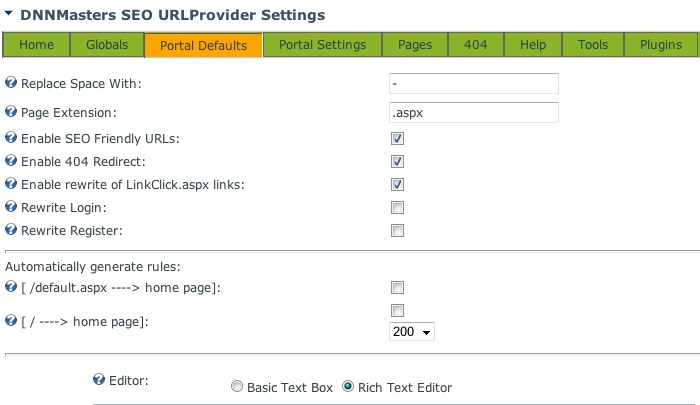
| • | Select portal to edit settings for, |
| • | Spaces in tab names will be replaced by (default character is dash '-'). This will only replace spaces in URL's not in actual tab names! |
| • | Set the extension (default setting is .aspx), |
| • | Enable / disable redirects, |
| • | Enable / disable 404 error redirect, |
| • | Enable rewriting of /LinkClick.aspx?LinkID=99 redirects to friendly URLs, |
| • | Rewrite Login links, |
| • | Rewrite Register Links, |
| • | Create automatic rule for redirect from /default.aspx to /home.aspx Attention: This will only work if you are running the module in extension-less configuration. Otherwise, this setting will cause redirect loop on your portal so please test before using on production site ! |
| • | Create automatic rule to redirect from www.domain.com to www.domain.com/home.aspx (with 200 or 301 code) |
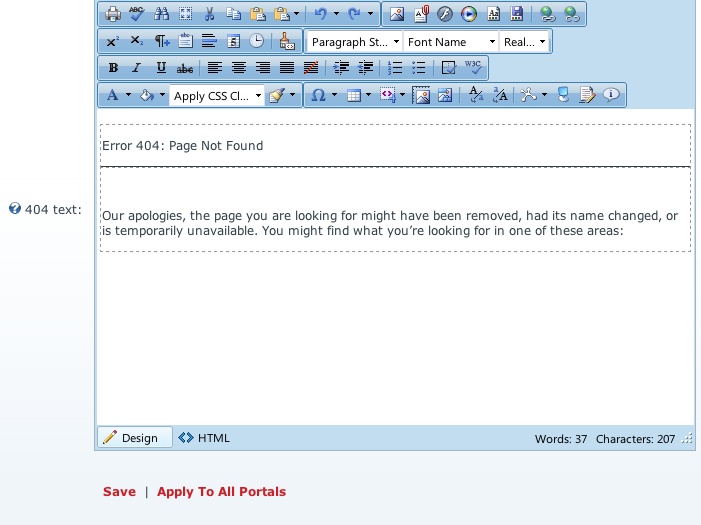
| • | Enter text to be displayed as 404 error |
Save changes first and Apply to all portals if needed.